
Run the front deskwithout the paperwork pile.
Reservations, check-in, guest folios, housekeeping, room rates and the registers you have to keep, in one place. Built for independent hotels, boutique hotels, hostels, resorts, vacation rentals and serviced apartments.
- Hotel
- Boutique hotel
- Hostel
- Resort
- Vacation rental
- Serviced apartment

The short answer
EkamOS is hotel management software (a property management system) for independent hotels, boutique hotels, hostels, resorts, vacation rentals and serviced apartments in India. It covers reservations, a front desk board, guest folios, housekeeping, a rate calendar, night audit, foreigner registration (Form C) deadline tracking, a guest register and GST invoices, and it works in a browser on a laptop or a phone.
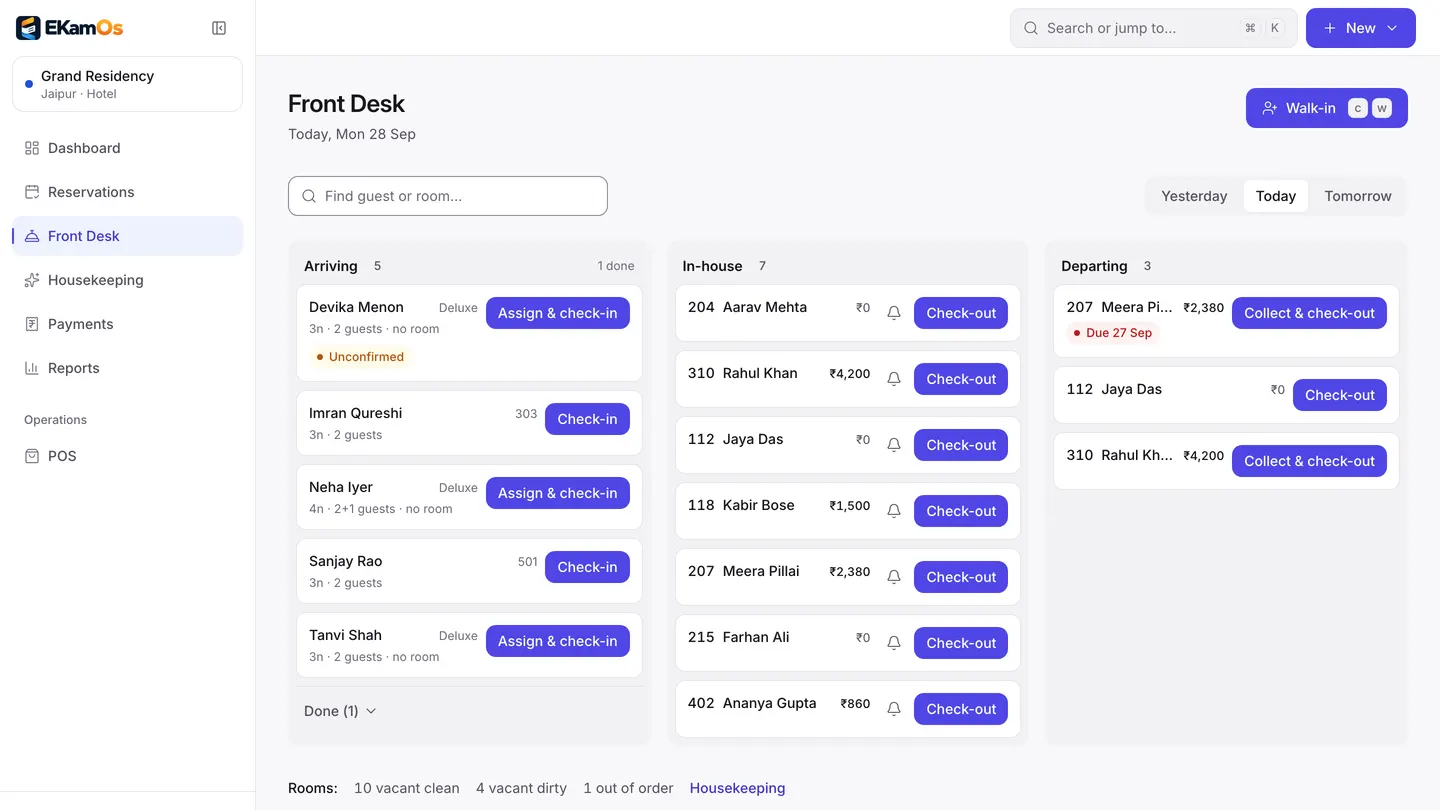
Front desk board. Sample data.
Why owners switch
The desk jobs that slip when it gets busy
Four things that usually live on paper or in someone’s head, and where they live in EkamOS.
Without EkamOS
The guest register is a book at the desk, and the second and third adult in a room are lines someone forgets to write.
With EkamOS
Check-in records every adult staying in the room, not just the booker, and the register exports by date range as CSV or PDF.
Without EkamOS
A foreign guest checks in late at night and nobody remembers the Form C deadline until it has passed.
With EkamOS
Each foreign guest gets a Form C record with a 24-hour deadline from check-in, shown as due or overdue until you mark it filed.
Without EkamOS
Café bills, laundry and extras sit on paper slips that never reach the final bill.
With EkamOS
Charges and payments go on the guest’s folio, café orders can be charged to the room, and check-out settles the folio into one invoice.
Without EkamOS
Rates change over WhatsApp, and the night’s room charges are posted whenever someone remembers.
With EkamOS
Prices are set by date on the rate calendar, by the owner only, and a night audit closes each day by posting room charges and marking no-shows.
What you can do today
Everything on this page is in the product now
Reservations
Create and search bookings, with ready-made views for arriving today, departing today and the next seven days.
Front desk board
Arriving, in-house and departing guests on one screen, with check-in, walk-ins and check-out.
Guest folios
Post charges and payments to a guest’s folio from the front desk. Payments on the folio settle its invoice.
Room types and rooms
Set up your room types and the rooms in each.
Housekeeping
Cleaning and maintenance tasks by room, with status, so the desk knows which rooms are ready.
Rate calendar
Room types down the side and dates across, with availability and a price row per rate plan. Set a price, minimum stay, closed to arrival or departure, or stop selling for a range of dates, and add weekday or seasonal pricing rules. Only the owner can change prices.
Rate suggestions
Suggested nightly rates per room type. Only the owner can apply a suggestion.
Night audit
A checklist to close the business day: room charges to post, no-shows, pending check-outs and open balances. Running it posts the night’s room charges and saves a report with occupancy, average daily rate, revenue per available room, revenue and payments, which you can download as a PDF. Only the owner can reopen a closed day.
Foreigner registration (Form C) tracking
Check-in collects nationality and passport details. Each foreign guest gets a Form C record with a 24-hour deadline from check-in, shown as due or overdue until you mark it filed.
Guest register with every occupant
Record each adult staying in the room, not just the booker, and export the register by date range as CSV or PDF.
Direct booking page
A booking page for your own website, served by EkamOS, so guests can book without an online travel agency.
Guest feedback
Send guests a feedback link after their stay and read the answers in one place.
How a day runs
From booking to night audit
A guest books
On your direct booking page, or at the desk.
Check-in
Every adult in the room is recorded, with passport details for a foreign guest. The Form C clock starts.
The stay
Room, café and other charges go on the folio.
Check-out
The folio settles into a GST invoice, and housekeeping turns the room.
Night audit
Tonight’s room charges are posted, no-shows marked, and the day’s report saved.
Works with the rest of EkamOS
A hotel is rarely just rooms
Add the other parts of your business as locations or modules, under the same login.
Your café or restaurant
The point of sale and kitchen display, with orders charged to an in-house guest’s room.
A banquet hall or lawn
Event spaces, packages, advances and GST invoices next to the rooms.
Inventory
Stock, suppliers and purchase orders for the kitchen and housekeeping store.
Accounts and reports
GST invoices with credit notes, Tally export, and reports for every location together.
Coming soon
Not built yet
Asked for often, not in the product today. If one of these is a must, tell us on the demo call.
Roadmap- Live channel manager sync with online travel agencies. Booking.com, MakeMyTrip and Goibibo connections exist in the app but are labelled beta and are not live yet.
- Online prepayment on the direct booking page
- Meal plans on the rate calendar
- Group bookings and company billing
Questions
Hotel questions, answered
Is EkamOS a hotel property management system (PMS)?
Yes. EkamOS covers what a small or mid-sized hotel PMS does day to day: reservations, a front desk board for check-in and check-out, guest folios, room types, housekeeping, a rate calendar, night audit, a guest register and GST invoices. It runs in a web browser, so there is nothing to install at the desk.
Does EkamOS file Form C for me?
No. EkamOS records the foreign guest’s passport details at check-in and tracks the 24-hour Form C deadline, showing each record as due or overdue. Filing it on the government portal is still done by you; once filed, you mark the record as filed in EkamOS.
Does EkamOS connect to Booking.com, MakeMyTrip or Goibibo?
Not yet. The connections exist in the app but are labelled beta and do not sync live, so treat them as not available. Guests can book you directly on the EkamOS booking page for your own website.
Can guests pay online when they book on my website?
Not yet. The direct booking page takes the booking; online prepayment on it is on the roadmap. Invoices can be paid online through Razorpay when that is switched on for your account.
Who can change room rates?
Only the owner. Staff can see the rate calendar and rate suggestions, but changing a price, applying a suggestion or reopening a closed night audit is owner-only, and the server checks it as well as the app.
Does EkamOS do night audit?
Yes. The night audit screen lists room charges to post, no-shows, pending check-outs and open balances. Running it posts the night’s room charges, marks no-shows and saves a report with occupancy, average daily rate and revenue per available room, which you can download as a PDF.
Can my hotel café charge food to a guest’s room?
Yes, for a café on the same property. At the counter, staff post the order to an in-house guest’s folio instead of taking payment, and it is settled with the rest of the stay at check-out.
Which kinds of stays does it suit?
Hotels, boutique hotels, hostels, resorts, vacation rentals and serviced apartments. You pick the type when the location is set up and EkamOS uses its words, for example beds in a hostel and residents in a serviced apartment. Long stays billed by the month are better run on the PG and co-living setup.
See the front desk with your own rooms in it
Book a demo and we will walk through check-in, the folio, the rate calendar and night audit, and tell you plainly what is not ready yet.