
From order to kitchen to bill,on one screen.
For cafés, restaurants, cloud kitchens and food courts, on their own or inside a hotel. Orders reach the kitchen as tickets, the kitchen works from a live display, and every settled order becomes a GST bill you can print and hand over.
- Café
- Restaurant
- Cloud kitchen
- Food court

The short answer
EkamOS is point of sale (POS) software for cafés, restaurants, cloud kitchens and food courts in India. It takes dine-in, takeaway and delivery orders, sends kitchen order tickets to a kitchen display, keeps a table floor map, splits and merges bills, prints GST bills on 58 or 80 mm thermal paper, controls discounts with manager approval, closes the cash drawer each day, and costs dishes from their recipes.
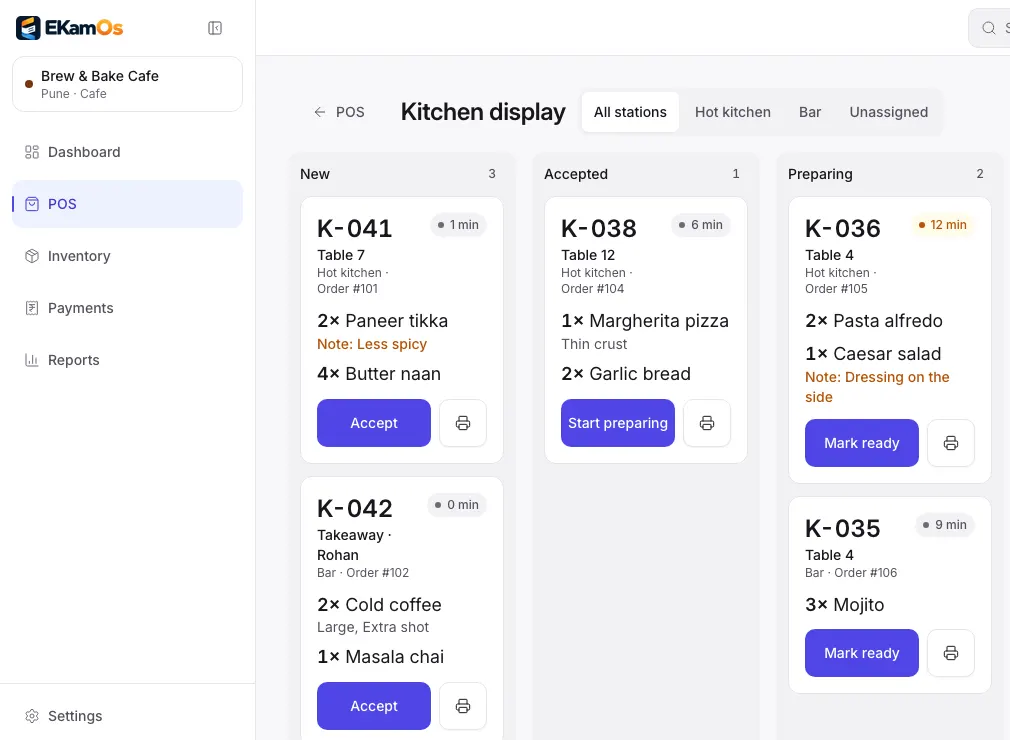
Kitchen display. Sample data.
Why owners switch
What goes wrong in a rush, and what EkamOS does about it
Without EkamOS
The Wi-Fi drops in the middle of lunch and the billing app stops taking orders.
With EkamOS
Staff keep opening orders, adding items and sending them to the kitchen. Orders are saved on the device and sent once each when the connection is back. Payments wait until you are online, so money is recorded exactly once.
Without EkamOS
Orders are shouted or scribbled to the kitchen, and nobody knows how long table 6 has been waiting.
With EkamOS
Each order goes to its kitchen station as a numbered ticket, and the kitchen display shows every ticket’s age as it moves from New to Ready.
Without EkamOS
Discounts are given at the counter without anyone approving them, and the cash drawer never quite matches.
With EkamOS
Staff can discount up to a limit you set; above it a manager approves with a PIN. Day close counts the drawer note by note and prints X and Z reports.
Without EkamOS
You know what you sold, but not what each plate cost you to make.
With EkamOS
Recipes link menu items to ingredients, stock is deducted per serve, and the food cost report shows cost against price by item and category.
What you can do today
Everything on this page is in the product now
Touch-first point of sale
Dine-in, takeaway and delivery orders from a menu with categories, modifiers and veg, non-veg and egg marks, sized for tablets and phones.
Table floor map
See which tables are free or occupied, open a table’s live order, move an order to another table, merge two checks, and record the number of covers.
Kitchen order tickets (KOT)
Send an order to the kitchen as a numbered ticket, add more rounds later, route items to stations, and print tickets on 80 mm thermal paper when sent or reprinted.
Kitchen display screen
A live board for the kitchen with New, Accepted, Preparing and Ready columns, filtered by station, with the age of every ticket.
Keeps taking orders when the Wi-Fi drops
If the connection goes, staff can still open orders, add items and send them to the kitchen. They are sent to the server, once each, when the connection is back. Payments, bill splits and room charges wait until you are online.
Installable on a tablet
Install the point of sale and kitchen display on a tablet like an app. The kitchen display keeps showing its last tickets during an outage and catches up when the connection returns.
GST bills you can hand over
Settling an order issues a GST bill with your legal name, GSTIN, FSSAI number and the CGST and SGST split. Print it on 58 or 80 mm thermal paper or A4, download a PDF or share it from the phone. Reprints are marked DUPLICATE, and every bill is in a searchable list.
Split bills
Split a served order into separate checks per diner and settle each one.
Menu prices with or without GST
Choose whether menu prices include GST or have it added at the counter.
Discounts and happy hour
Staff can give discounts up to a limit you set, as a percentage or an amount; above it a manager approves with their PIN. Schedule happy-hour promotions by outlet.
Day close
Open the cash drawer with a float, record cash in and out with a reason, count the drawer by denomination at close, and print X and Z reports. Only the owner can reopen a closed day.
Refunds as credit notes
Refund a paid bill from the bill drawer. EkamOS issues a credit note against it, so the original bill stays intact.
Charge to room
In a hotel café, post an order to an in-house guest’s folio instead of taking payment at the counter.
Customers and loyalty
A customer list built from orders by phone number, with visits and spend. Award loyalty points through an automation and let customers redeem them as a discount at the counter.
QR ordering at the table
Guests scan a table’s QR code, order from your menu, and the order goes straight to the kitchen display. They can pay online through Razorpay when it is set up, or at the counter. Print a sheet of table QR codes from café setup.
Switched on at setupInventory, suppliers and purchase orders
Stock items with reorder levels and stock movements. Raise purchase orders to suppliers, receive goods in full or in part, and keep each item’s unit cost up to date from what you paid.
Recipes and food cost
Recipes link each menu item to its ingredients, with a wastage allowance. Stock is deducted as dishes are served, every plate gets a cost, and the food cost report shows cost against price by item and category, with theoretical against actual usage per ingredient.
Sales reports
Café sales for any period, broken down by item and by payment type.
Food court vendors and settlements
Keep each stall’s details and documents, and work out what each vendor is owed.
Add-on, included for food courts
How a service runs
From the first order to day close
Open the drawer
Start the day’s cash session with an opening float.
Take the order
At the table on a phone, on the counter tablet, or from the guest’s own QR order.
Kitchen
A numbered ticket reaches its station, and the display moves it from New to Ready.
Bill
Split, merge or move tables if needed, then settle and hand over a printed GST bill.
Close the day
Count the drawer, print the Z report, and see the day’s sales by item and payment type.
Works with the rest of EkamOS
Inside a hotel, or next to one
Hotel rooms
Charge an order to an in-house guest’s folio and settle it at check-out.
Inventory
Every served dish draws its recipe from stock, so the kitchen and the store stay in step.
Accounts
Café bills go to the same GST ledger, reports and Tally export as the rest of the business.
Staff and roles
Decide who can discount, refund, close the day or change menu prices.
Coming soon
Not built yet
Asked for often, not in the product today.
Roadmap- Swiggy and Zomato orders arriving in the POS on their own. You can tag an order’s source today, but the connection to either platform is not live.
- Taking payments and settling bills while offline
Questions
Café and restaurant questions, answered
Does the EkamOS POS work without internet?
Partly, by design. If the connection drops, staff can keep opening orders, adding items and sending them to the kitchen; the orders are saved on the device and sent once each when the connection returns. Taking payment, splitting bills and charging to a room wait until you are back online, so money is never recorded twice.
Can I print bills and kitchen tickets on a thermal printer?
Yes. Bills print on 58 mm or 80 mm thermal paper or on A4, and kitchen tickets print on 80 mm paper. EkamOS prints through the device’s print dialog, so it uses a printer your tablet or computer can already print to. You can also download a bill as a PDF or as an ESC/POS file.
What is on the GST bill?
Your legal name, GSTIN and FSSAI number, the bill number, the date and time, the items, the taxable value, the CGST and SGST split, the total and the payment mode. Menu prices can include GST or have it added at the counter, and refunds are issued as credit notes.
Does EkamOS connect to Swiggy and Zomato?
Not live yet. You can tag an order’s source as Swiggy or Zomato, but orders do not yet arrive from either platform on their own, so delivery orders are still entered at the POS.
Can guests order from their table with a QR code?
Yes, when QR ordering is switched on for your outlet during setup. Guests scan the table’s code, order from your menu, and the order goes to the kitchen display. They can pay online through Razorpay if that is set up for your account, or pay at the counter.
How do I stop unapproved discounts?
Set a discount limit, as a percentage or an amount. Staff can discount up to it on their own; anything above needs a manager to approve with their PIN. Happy-hour promotions are scheduled separately and do not count towards the limit.
Does it track food cost?
Yes. Recipes link menu items to ingredients, with a wastage allowance. Stock is deducted as dishes are served, unit costs update from goods you receive against purchase orders, and the food cost report shows cost against price by item and category.
Can I run a food court or cloud kitchen on it?
Yes. Cloud kitchens use the same point of sale and kitchen display. Food courts also get vendor records and vendor settlements, which are an add-on that is included for the food court business type.
See an order go from table to kitchen to bill
Book a demo and we will run a service on the POS and kitchen display, print a bill, and close the day.