
Members, desks and meeting rooms,billed on time.
For coworking spaces and business centres. Sell memberships, allocate seats, let members and guests book meeting rooms by the hour, sign visitors in at a kiosk, and invoice every month without a spreadsheet.
- Coworking space
- Business centre

The short answer
EkamOS is coworking space management software for coworking spaces and business centres in India. It manages membership plans and members, desks and cabins, meeting rooms booked by the hour (including a public booking page), member company onboarding with documents, a visitor log with a sign-in kiosk, a print log, and monthly membership invoices with GST that can be raised automatically.
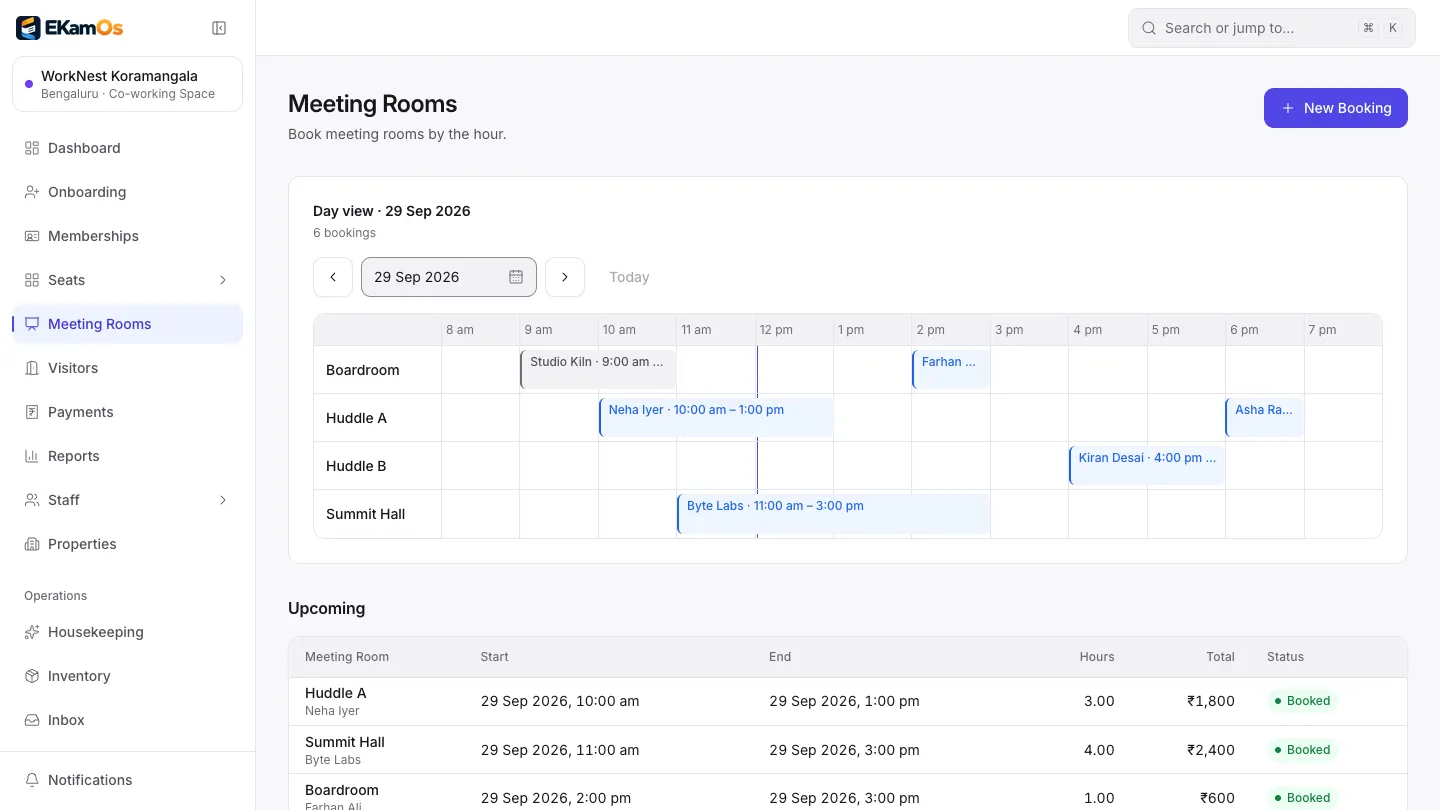
Meeting rooms day view. Sample data.
Why operators switch
Less admin between you and your members
Without EkamOS
Members are in one spreadsheet, invoices in another, and a cabin goes unbilled for a month.
With EkamOS
Every membership carries its next billing date. Switch on automatic invoices and EkamOS raises them on schedule, with GST, as drafts to review or issued directly.
Without EkamOS
Meeting rooms are booked on a whiteboard and a WhatsApp group.
With EkamOS
A day view across all rooms, an upcoming list, and a public page where members and guests book a room by the hour without an account.
Without EkamOS
Visitors sign a paper register at reception that nobody reads.
With EkamOS
Visitors sign in at a branded kiosk link or QR code, and the desk sees who is on the premises today.
Without EkamOS
Onboarding a company means a folder of PAN cards, GST certificates and agreements.
With EkamOS
Onboard the member company with its PAN card, GST certificate and company document in EkamOS, then assign seats. Uploads are private to your team.
What you can do today
Everything on this page is in the product now
Memberships
Membership plans and members, with the next billing date on every membership and search across them.
Seat plans and seats
Plans for a single desk or a cabin that seats several people, and a record of which seat each member holds.
Member onboarding
Onboard a member company with its PAN card, GST certificate and company document, then assign seats.
Meeting rooms by the hour
A day view across rooms, an upcoming list, and a public page where people can book a room without an account.
Visitor log and kiosk
Visitors sign in at a branded kiosk link or QR code, and the desk sees who is on the premises today.
Print log
Record print usage per member.
Automatic monthly invoices (optional)
Turn on automatic invoicing and EkamOS raises membership invoices on schedule, as drafts for review or issued directly. Off until you switch it on, with a preview of what is coming up.
GST on membership invoices
Membership invoices carry GST like every other EkamOS invoice, and can be paid online through Razorpay when that is switched on.
How a month runs
From a new member to the monthly invoice
Onboard
Add the member company and its documents.
Seat
Assign a desk or a cabin on a seat plan.
Book rooms
Members and guests book meeting rooms by the hour.
Sign visitors in
At the kiosk, so the desk knows who is in.
Invoice
Membership invoices are raised with GST, by hand or automatically.
Works with the rest of EkamOS
A coworking floor with a café, or a PG upstairs
A café on the floor
Run the point of sale and kitchen display as another location under the same login.
Leads
Track enquiries from your website and walk-ins as leads and follow them up.
Accounts
Membership invoices sit in the same GST ledger, reports and Tally export as everything else.
Every location together
See what is collected and outstanding across all your spaces on the Properties page.
Coming soon
Not built yet
Roadmap- Meeting-room credits that are deducted automatically
- A member app for booking and paying invoices
- Door access control integrations
Questions
Coworking questions, answered
What does EkamOS do for a coworking space?
It keeps memberships, seat plans and seat assignments, meeting room bookings by the hour, member company onboarding with documents, a visitor log with a sign-in kiosk and a print log, and it raises monthly membership invoices with GST.
Can EkamOS raise membership invoices automatically?
Yes, if you switch it on. Automatic invoicing is off by default. When it is on, EkamOS raises membership invoices on schedule, either as drafts for you to review or issued directly, and shows you the upcoming invoices before they are raised.
Can people outside my space book a meeting room?
Yes. Each space gets a public meeting-room booking page where people can book by the hour without an EkamOS account. Bookings appear in the day view alongside members’ bookings.
Do members get their own app?
Not yet. A member app for booking rooms and paying invoices is on the roadmap. Today members book rooms on the public booking page, and invoices can be paid online through Razorpay when it is switched on for your account.
Does EkamOS control door access?
No. Door access control integrations are on the roadmap and are not in the product today.
How do I get the coworking module?
The coworking module is switched on for your location by our team when your account is set up, rather than self-serve. Book a demo and tell us you run a coworking space or business centre.
See a month of coworking admin in ten minutes
Book a demo and we will onboard a member, book a room and raise the month’s invoices in front of you.